














How to report issues with your Mac Wrapper
Дата: 28.03.2014 22:53:52
Trevzor: Tankers! As the READ THIS POST FIRST thread stated, there is
a very limited amount of support we can offer for the Mac Wrapper.
Reporting the type of issue you have is the first step in
receiving help for your issue. HOW TO FORMAT YOUR SUPPORT
SECTION POST: When you post your issue to the support section, we
are looking for some very specific information that our developers
are going to look at while this project is in development. We need
you to post your Influx_PS log, the last 4 entries of your
Python log, and the hardware details of your Mac. The Influx and
Python logs can be found in the Documents/World_of_Tanks folder.
Hardware details can be found in "About this Mac" EXAMPLE
[Type a description of your issue here. Remember to be as specific
as possible as the more specifics we have the more likely we will
be able to help] Influx_PS log: «««««
Bold, Underlined, and spoilers please Warning: PS::ERROR
FrameRender_Pause(??????? ???????? ?? ?????????????) Warning:
PS::ERROR FrameRender_Pause(??????? ???????? ?? ?????????????)
ERROR: MCMD_DEVICE_LOST
ERROR: MCMD_DEVICE_RESET
Info: preload start -------------------------------
Info: load default --
Info: preload start -------------------------------
ERROR: Shaders not found :
Warning: PS::RegisterShader \data\shaders\ps_water.fx \data\specialeffects\textures\eff_tex.dds
Warning: PS::RegisterShader \data\shaders\ps_long.fx \data\specialeffects\textures\eff_tex.dds
Warning: PS::RegisterShader \data\shaders\ps.fx \data\specialeffects\textures\eff_tex.dds
Info: preload done ------------------------------------
Info: load def done --
Info: preload done ------------------------------------
ERROR: MCMD_DEVICE_LOST Python log: ««««« Bold, Underlined, and spoilers please /------------------------------------------------------------------------------------------------------------------------\
BigWorld Release Client (compiled at 13:35:08 Jan 30 2014) starting on Thu Mar 27 16:16:28 2014 Checking ./res_mods/0.8.11: mods found
[ERROR] (scripts/common/DestructiblesCache.py, 454): Destructibles effect inf_envEU_015_IceFloe_01 is not found
[ERROR] (scripts/common/DestructiblesCache.py, 454): Destructibles effect inf_envEU_015_IceFloe_01 is not found
[NOTE] (scripts/client/post_processing/__init__.py, 275): The quality = 0 was selected.
[NOTE] (scripts/client/post_processing/__init__.py, 275): The quality = 0 was selected.
[SPACE] Loading space: spaces/39_crimea
Traceback (most recent call last):
File "scripts/client/AvatarInputHandler/aims.py", line 421, in setReloadingFromReplay
File "scripts/client/AvatarInputHandler/aims.py", line 448, in _setReloadingAsPercent
File "scripts/client/AvatarInputHandler/aims.py", line 544, in _flashCall
File "scripts/client/gui/Scaleform/Flash.py", line 128, in call
File "scripts/client/gui/Scaleform/Flash.py", line 70, in movie
AttributeError: 'ArcadeAim' object has no attribute 'component'
PostProcessing.Phases.fini() \------------------------------------------------------------------------------------------------------------------------/ /------------------------------------------------------------------------------------------------------------------------\
BigWorld Release Client (compiled at 13:35:08 Jan 30 2014) starting on Thu Mar 27 16:29:10 2014 Checking ./res_mods/0.8.11: mods found
[ERROR] (scripts/common/DestructiblesCache.py, 454): Destructibles effect inf_envEU_015_IceFloe_01 is not found
[ERROR] (scripts/common/DestructiblesCache.py, 454): Destructibles effect inf_envEU_015_IceFloe_01 is not found
[NOTE] (scripts/client/post_processing/__init__.py, 275): The quality = 0 was selected.
[NOTE] (scripts/client/post_processing/__init__.py, 275): The quality = 0 was selected.
[SPACE] Loading space: spaces/hangar_premium
[WARNING.GUI] (scripts/client/gui/Scaleform/Flash.py, 261): Incapsulation waas broken. unitChannelComponent.sendButton can be not disposed!
[WARNING.GUI] (scripts/client/gui/Scaleform/Flash.py, 261): Incapsulation waas broken. unitChannelComponent.sendButton can be not disposed!
PostProcessing.Phases.fini()
[EXCEPTION] (scripts/common/Event.py, 34):
Traceback (most recent call last):
File "scripts/common/Event.py", line 32, in __call__
File "scripts/client/LightFx/LightManager.py", line 254, in __onDisconnected
AttributeError: 'NoneType' object has no attribute 'setStartupLights' \------------------------------------------------------------------------------------------------------------------------/ /------------------------------------------------------------------------------------------------------------------------\
BigWorld Release Client (compiled at 13:35:08 Jan 30 2014) starting on Thu Mar 27 17:47:54 2014 Checking ./res_mods/0.8.11: mods found
[ERROR] (scripts/common/DestructiblesCache.py, 454): Destructibles effect inf_envEU_015_IceFloe_01 is not found
[ERROR] (scripts/common/DestructiblesCache.py, 454): Destructibles effect inf_envEU_015_IceFloe_01 is not found
[NOTE] (scripts/client/post_processing/__init__.py, 275): The quality = 0 was selected.
[NOTE] (scripts/client/post_processing/__init__.py, 275): The quality = 0 was selected.
[SPACE] Loading space: spaces/hangar_premium
[SPACE] Loading space: spaces/hangar_premium
[SPACE] Loading space: spaces/86_himmelsdorf_winter
PostProcessing.Phases.fini()
[EXCEPTION] (scripts/common/Event.py, 34):
Traceback (most recent call last):
File "scripts/common/Event.py", line 32, in __call__
File "scripts/client/LightFx/LightManager.py", line 254, in __onDisconnected
AttributeError: 'NoneType' object has no attribute 'setStartupLights' \------------------------------------------------------------------------------------------------------------------------/ /------------------------------------------------------------------------------------------------------------------------\
BigWorld Release Client (compiled at 13:35:08 Jan 30 2014) starting on Thu Mar 27 17:53:53 2014 Checking ./res_mods/0.8.11: mods found
[ERROR] (scripts/common/DestructiblesCache.py, 454): Destructibles effect inf_envEU_015_IceFloe_01 is not found
[ERROR] (scripts/common/DestructiblesCache.py, 454): Destructibles effect inf_envEU_015_IceFloe_01 is not found
[NOTE] (scripts/client/post_processing/__init__.py, 275): The quality = 0 was selected.
[NOTE] (scripts/client/post_processing/__init__.py, 275): The quality = 0 was selected.
[SPACE] Loading space: spaces/86_himmelsdorf_winter
[SPACE] Loading space: spaces/hangar_premium
PostProcessing.Phases.fini()
[EXCEPTION] (scripts/common/Event.py, 34):
Traceback (most recent call last):
File "scripts/common/Event.py", line 32, in __call__
File "scripts/client/LightFx/LightManager.py", line 254, in __onDisconnected
AttributeError: 'NoneType' object has no attribute 'setStartupLights' \------------------------------------------------------------------------------------------------------------------------/ Mac Hardware Information: ««««« Bold, Underlined, and spoilers please. (Overview and Graphics card only) Hardware Overview: Model Name: MacBook Pro Model Identifier: MacBookPro10,1 Processor Name: Intel Core i7 Processor Speed: 2.7 GHz Number of Processors: 1 Total Number of Cores: 4 L2 Cache (per Core): 256 KB L3 Cache: 8 MB Memory: 16 GB Boot ROM Version: MBP101.00EE.B02 SMC Version (system): 2.3f35 Serial Number (system): C02J327DF51R Hardware UUID: DB3E57FA-FFF7-5599-9A15-3A071E37A2E1 NVIDIA GeForce GT 650M: Chipset Model: NVIDIA GeForce GT 650M Type: GPU Bus: PCIe PCIe Lane Width: x8 VRAM (Total): 1024 MB Vendor: NVIDIA (0x10de) Device ID: 0x0fd5 Revision ID: 0x00a2 ROM Revision: 3688 gMux Version: 3.2.19 [3.2.8] To find the information on the Hardware in you Mac, follow these steps: Step one: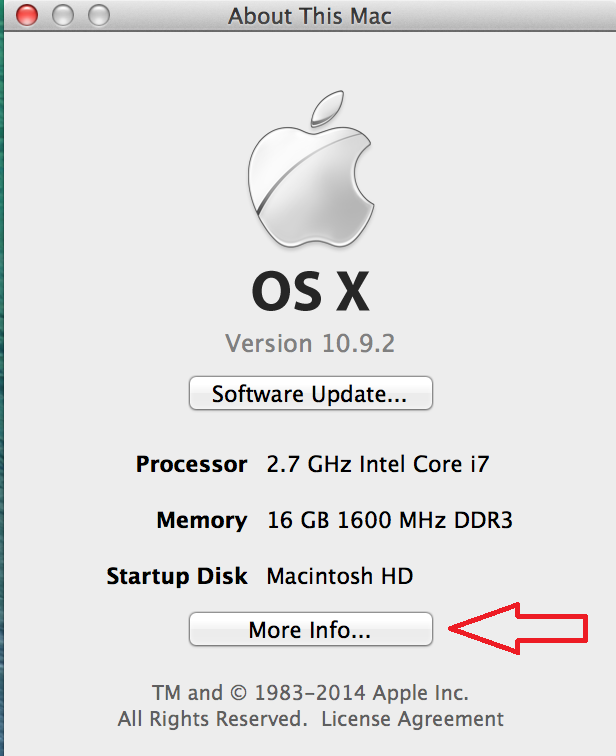 Step
two:
Step
two: 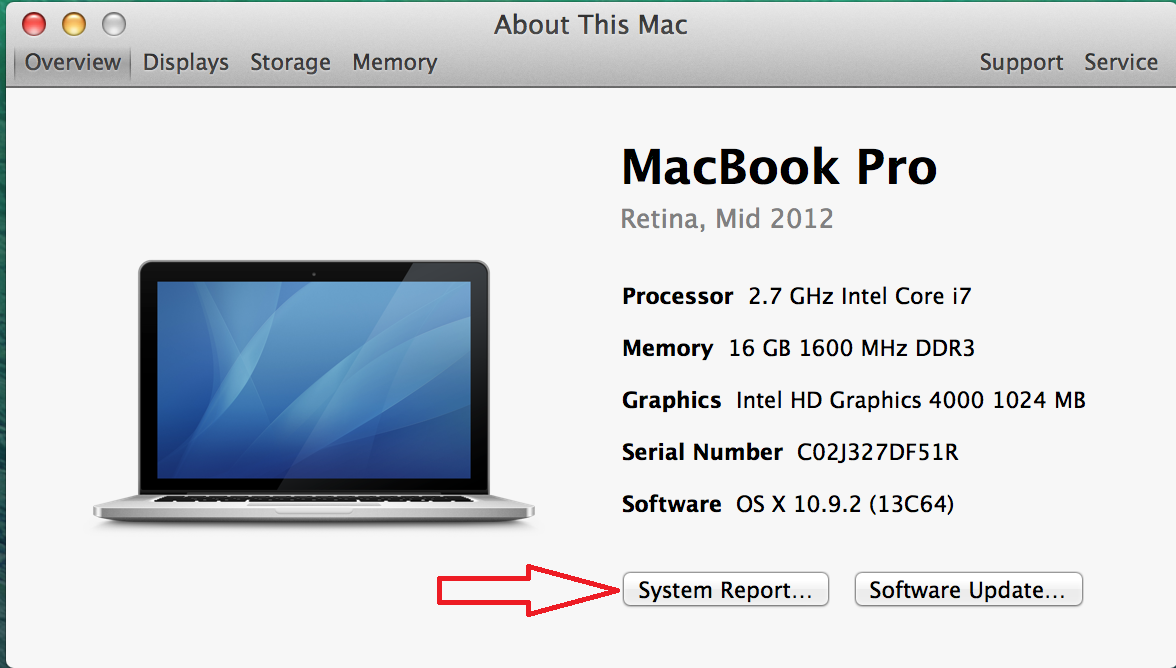 Step
three:
Step
three: 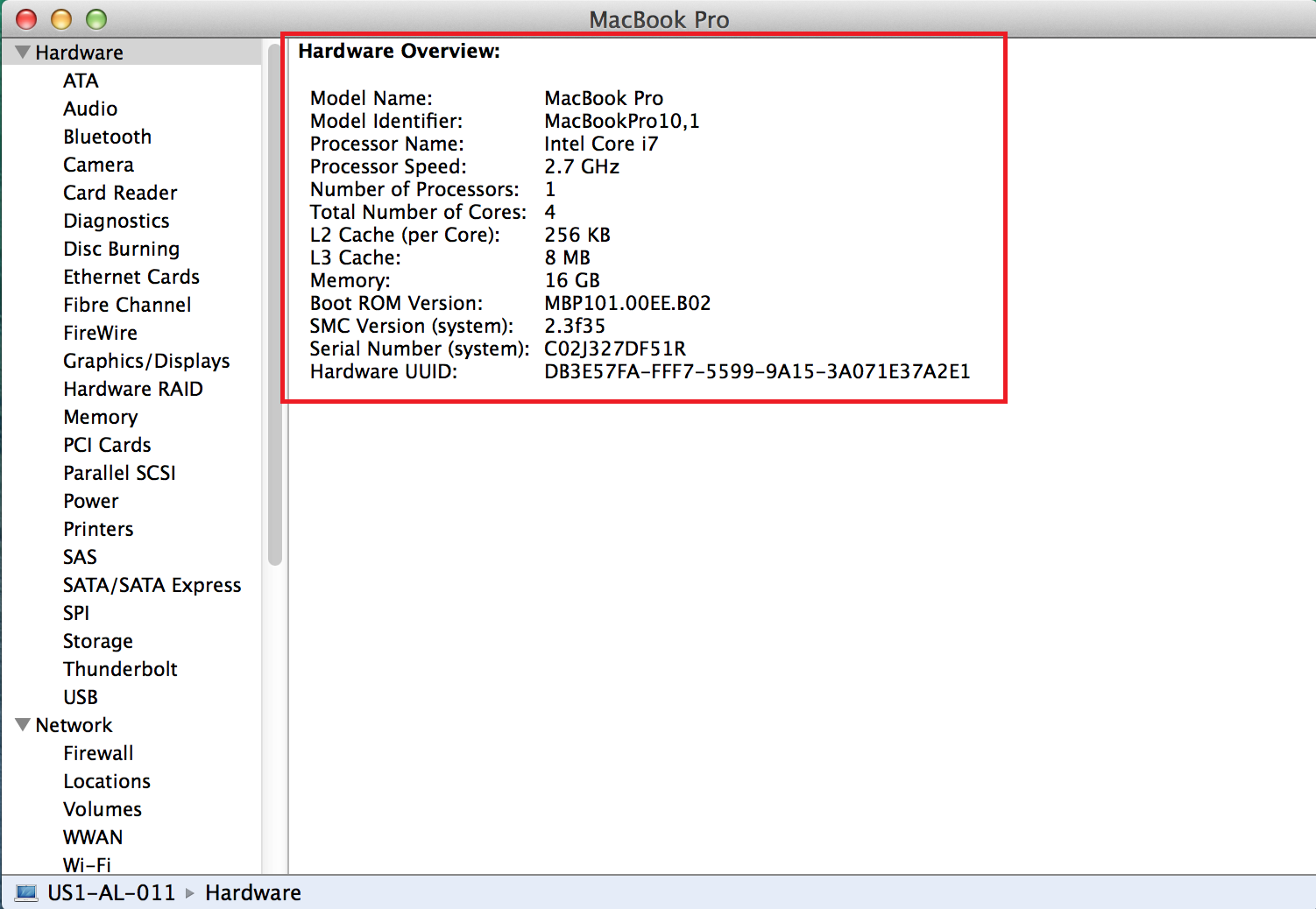 Step
four:
Step
four: 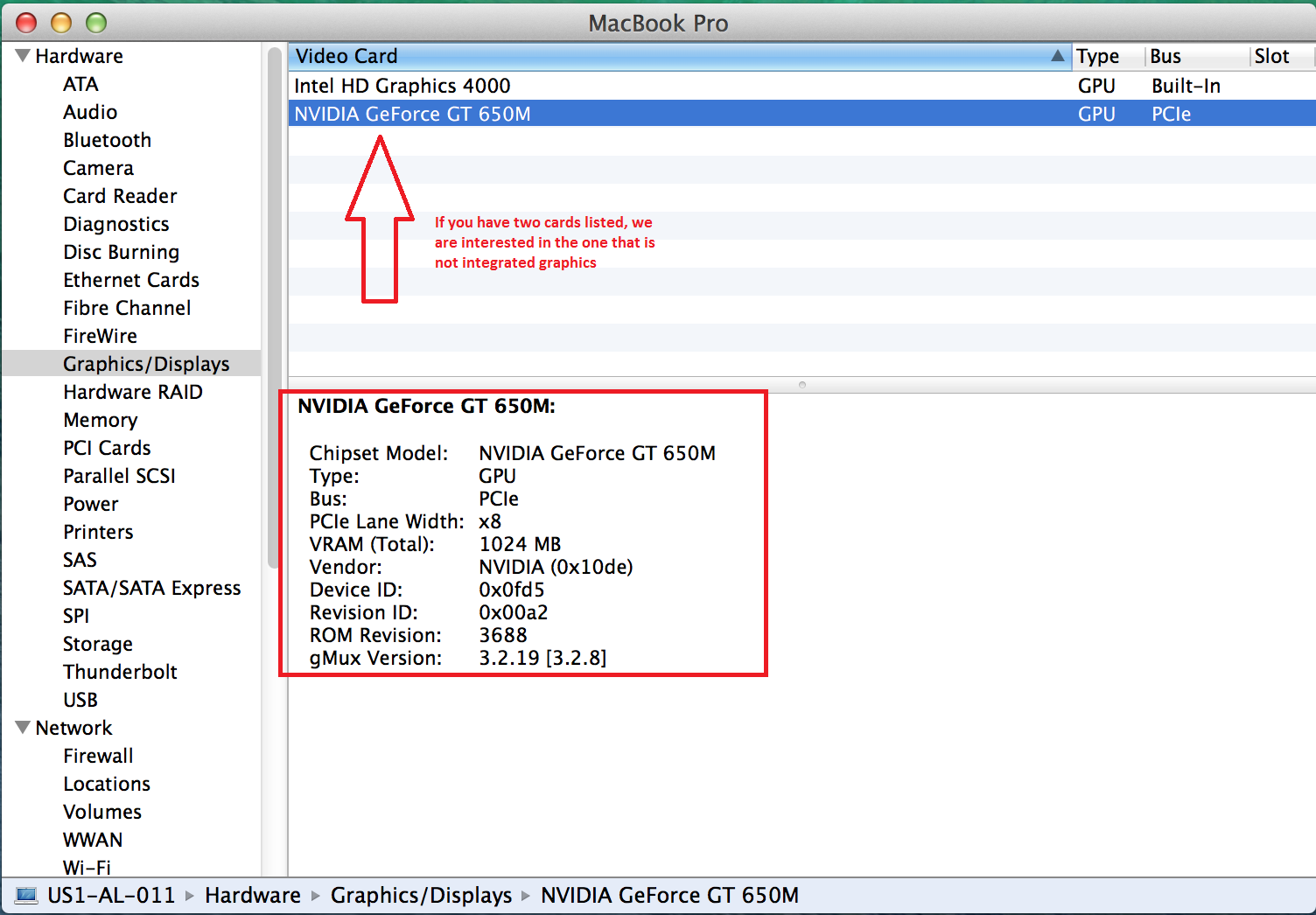 All of
this information is key for us to be able to offer Support and take
steps to improve our Mac Wrapper. See you on the field of
combat!
All of
this information is key for us to be able to offer Support and take
steps to improve our Mac Wrapper. See you on the field of
combat!
ERROR: MCMD_DEVICE_RESET
Info: preload start -------------------------------
Info: load default --
Info: preload start -------------------------------
ERROR: Shaders not found :
Warning: PS::RegisterShader \data\shaders\ps_water.fx \data\specialeffects\textures\eff_tex.dds
Warning: PS::RegisterShader \data\shaders\ps_long.fx \data\specialeffects\textures\eff_tex.dds
Warning: PS::RegisterShader \data\shaders\ps.fx \data\specialeffects\textures\eff_tex.dds
Info: preload done ------------------------------------
Info: load def done --
Info: preload done ------------------------------------
ERROR: MCMD_DEVICE_LOST Python log: ««««« Bold, Underlined, and spoilers please /------------------------------------------------------------------------------------------------------------------------\
BigWorld Release Client (compiled at 13:35:08 Jan 30 2014) starting on Thu Mar 27 16:16:28 2014 Checking ./res_mods/0.8.11: mods found
[ERROR] (scripts/common/DestructiblesCache.py, 454): Destructibles effect inf_envEU_015_IceFloe_01 is not found
[ERROR] (scripts/common/DestructiblesCache.py, 454): Destructibles effect inf_envEU_015_IceFloe_01 is not found
[NOTE] (scripts/client/post_processing/__init__.py, 275): The quality = 0 was selected.
[NOTE] (scripts/client/post_processing/__init__.py, 275): The quality = 0 was selected.
[SPACE] Loading space: spaces/39_crimea
Traceback (most recent call last):
File "scripts/client/AvatarInputHandler/aims.py", line 421, in setReloadingFromReplay
File "scripts/client/AvatarInputHandler/aims.py", line 448, in _setReloadingAsPercent
File "scripts/client/AvatarInputHandler/aims.py", line 544, in _flashCall
File "scripts/client/gui/Scaleform/Flash.py", line 128, in call
File "scripts/client/gui/Scaleform/Flash.py", line 70, in movie
AttributeError: 'ArcadeAim' object has no attribute 'component'
PostProcessing.Phases.fini() \------------------------------------------------------------------------------------------------------------------------/ /------------------------------------------------------------------------------------------------------------------------\
BigWorld Release Client (compiled at 13:35:08 Jan 30 2014) starting on Thu Mar 27 16:29:10 2014 Checking ./res_mods/0.8.11: mods found
[ERROR] (scripts/common/DestructiblesCache.py, 454): Destructibles effect inf_envEU_015_IceFloe_01 is not found
[ERROR] (scripts/common/DestructiblesCache.py, 454): Destructibles effect inf_envEU_015_IceFloe_01 is not found
[NOTE] (scripts/client/post_processing/__init__.py, 275): The quality = 0 was selected.
[NOTE] (scripts/client/post_processing/__init__.py, 275): The quality = 0 was selected.
[SPACE] Loading space: spaces/hangar_premium
[WARNING.GUI] (scripts/client/gui/Scaleform/Flash.py, 261): Incapsulation waas broken. unitChannelComponent.sendButton can be not disposed!
[WARNING.GUI] (scripts/client/gui/Scaleform/Flash.py, 261): Incapsulation waas broken. unitChannelComponent.sendButton can be not disposed!
PostProcessing.Phases.fini()
[EXCEPTION] (scripts/common/Event.py, 34):
Traceback (most recent call last):
File "scripts/common/Event.py", line 32, in __call__
File "scripts/client/LightFx/LightManager.py", line 254, in __onDisconnected
AttributeError: 'NoneType' object has no attribute 'setStartupLights' \------------------------------------------------------------------------------------------------------------------------/ /------------------------------------------------------------------------------------------------------------------------\
BigWorld Release Client (compiled at 13:35:08 Jan 30 2014) starting on Thu Mar 27 17:47:54 2014 Checking ./res_mods/0.8.11: mods found
[ERROR] (scripts/common/DestructiblesCache.py, 454): Destructibles effect inf_envEU_015_IceFloe_01 is not found
[ERROR] (scripts/common/DestructiblesCache.py, 454): Destructibles effect inf_envEU_015_IceFloe_01 is not found
[NOTE] (scripts/client/post_processing/__init__.py, 275): The quality = 0 was selected.
[NOTE] (scripts/client/post_processing/__init__.py, 275): The quality = 0 was selected.
[SPACE] Loading space: spaces/hangar_premium
[SPACE] Loading space: spaces/hangar_premium
[SPACE] Loading space: spaces/86_himmelsdorf_winter
PostProcessing.Phases.fini()
[EXCEPTION] (scripts/common/Event.py, 34):
Traceback (most recent call last):
File "scripts/common/Event.py", line 32, in __call__
File "scripts/client/LightFx/LightManager.py", line 254, in __onDisconnected
AttributeError: 'NoneType' object has no attribute 'setStartupLights' \------------------------------------------------------------------------------------------------------------------------/ /------------------------------------------------------------------------------------------------------------------------\
BigWorld Release Client (compiled at 13:35:08 Jan 30 2014) starting on Thu Mar 27 17:53:53 2014 Checking ./res_mods/0.8.11: mods found
[ERROR] (scripts/common/DestructiblesCache.py, 454): Destructibles effect inf_envEU_015_IceFloe_01 is not found
[ERROR] (scripts/common/DestructiblesCache.py, 454): Destructibles effect inf_envEU_015_IceFloe_01 is not found
[NOTE] (scripts/client/post_processing/__init__.py, 275): The quality = 0 was selected.
[NOTE] (scripts/client/post_processing/__init__.py, 275): The quality = 0 was selected.
[SPACE] Loading space: spaces/86_himmelsdorf_winter
[SPACE] Loading space: spaces/hangar_premium
PostProcessing.Phases.fini()
[EXCEPTION] (scripts/common/Event.py, 34):
Traceback (most recent call last):
File "scripts/common/Event.py", line 32, in __call__
File "scripts/client/LightFx/LightManager.py", line 254, in __onDisconnected
AttributeError: 'NoneType' object has no attribute 'setStartupLights' \------------------------------------------------------------------------------------------------------------------------/ Mac Hardware Information: ««««« Bold, Underlined, and spoilers please. (Overview and Graphics card only) Hardware Overview: Model Name: MacBook Pro Model Identifier: MacBookPro10,1 Processor Name: Intel Core i7 Processor Speed: 2.7 GHz Number of Processors: 1 Total Number of Cores: 4 L2 Cache (per Core): 256 KB L3 Cache: 8 MB Memory: 16 GB Boot ROM Version: MBP101.00EE.B02 SMC Version (system): 2.3f35 Serial Number (system): C02J327DF51R Hardware UUID: DB3E57FA-FFF7-5599-9A15-3A071E37A2E1 NVIDIA GeForce GT 650M: Chipset Model: NVIDIA GeForce GT 650M Type: GPU Bus: PCIe PCIe Lane Width: x8 VRAM (Total): 1024 MB Vendor: NVIDIA (0x10de) Device ID: 0x0fd5 Revision ID: 0x00a2 ROM Revision: 3688 gMux Version: 3.2.19 [3.2.8] To find the information on the Hardware in you Mac, follow these steps: Step one:
Step
two: Step
three: Step
four: All of
this information is key for us to be able to offer Support and take
steps to improve our Mac Wrapper. See you on the field of
combat! How to report issues with your Mac Wrapper